Minecraft Education Preview
- 3.7
- Rating
- 10.00M
- Installs
- Free
- Price
 Analysis by App-foxy
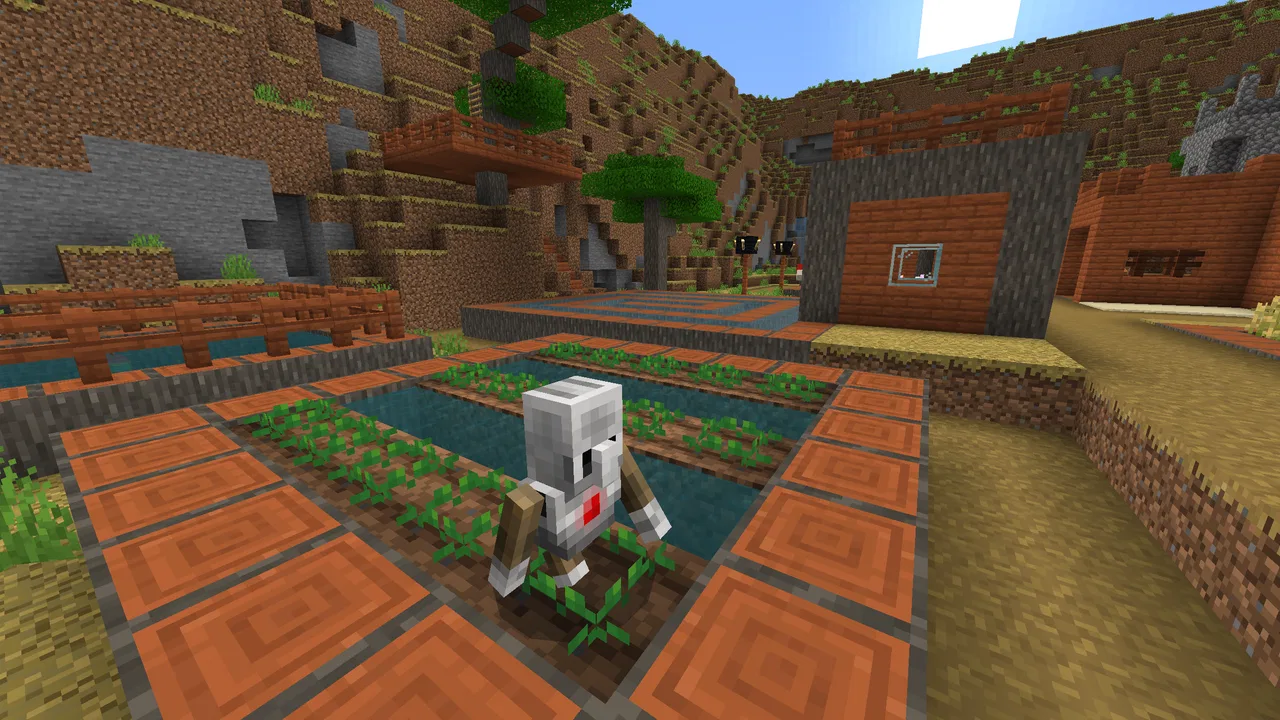
I approached Minecraft Education Preview less like a normal building game and more like a classroom toolkit that happens to use blocks, exploration, and creative problem-solving. That distinction matters. If you already enjoy Minecraft, the familiar visual language makes the learning activities feel approachable; if you are looking for the complete entertainment experience first, the educational focus can feel more structured than expected.
This is a free education app from Mojang, aimed at learners, teachers, families, and anyone who wants to use Minecraft as a practical way to explore ideas. It carries an Everyone 10+ content rating, runs on Android 8.0 or later, and the current version is 1.21.131.1. Those details make it fairly accessible, although the best experience still depends on having a capable device and a clear reason for using it.
How Minecraft Education Preview feels today
My first impression is that the app works best when there is a task behind the play. Building a house simply because it looks nice can be enjoyable, but the educational value becomes much clearer when a learner has to design a model, explain a process, solve a problem, or collaborate with someone else. The block-based world gives abstract ideas a physical shape, which is one of its strongest qualities.
You May Also Like

 Blood Strike: 2.5 Anniversary
Blood Strike’s Loadouts Turn Every Drop Into a Tactical Gamble
A close look at Blood Strike’s custom loadouts: how fast access to signature weapons reshapes its battle royale rhythm, rewards preparation, and narrows the gap between fights.

 Pandora - Music & Podcasts
Pandora’s Music Is Easy to Start, but Harder to Recover
Pandora’s strength is its low-effort path from a seed to a station. Its weak spot is how much confidence it asks you to place in connection, setup, and quiet recovery.

 8 Ball Pool
 Is Built on Rivalries, Rematches, and Routine
A close look at the rivalries, rematches, shared routines, and unanswered safety questions that turn a quick pool match into a persistent mobile community.

 Samsung Music
’s Quiet Strength Is Playing What You Already Own
Its reach comes less from spectacle than from dependable access to a personal library. That simplicity is both the app’s strongest retention engine and its ceiling.

 AccuWeather: Weather Radar
AccuWeather Review: A Quick, Clear Forecast for Everyday Decisions
For everyday plans, the best forecast is the one you can understand quickly. AccuWeather makes rain timing, radar, and local conditions easy to act on, with a few trade-offs.

 Hill Climb Racing
Why Hill Climb Racing Still Turns Crashes Into One More Run
A tiny car, a bumpy hill and one more upgrade: Hill Climb Racing keeps resurfacing because its simple chaos makes every near-miss feel personal.
More From Our News Desk
View All News


The word “Education” is important here. This is not merely the standard Minecraft experience with a school label attached. The point is to encourage creativity, collaboration, and problem-solving through activities that can be explored inside the game world. I found that the app rewards curiosity, but it also rewards preparation: a teacher, parent, or learner who starts with a specific goal will usually get more from it than someone who opens it expecting an entirely free-form adventure.
Mojang has positioned the app in the education category, and that placement makes sense. It can support classroom demonstrations, guided projects, group challenges, and independent exploration. It is also useful at home when an adult wants to turn a familiar game into a conversation starter about planning, systems, design, or teamwork.
The app has reached over ten million installs and holds a 4.0 average from around nineteen thousand ratings. I would read those figures as signs of broad interest rather than a guarantee that every learner will enjoy it. Minecraft’s open-ended nature is a strength for imaginative users, but it can be a weakness for anyone who needs a very direct lesson path or immediate feedback.
Why the block world is useful for learning
A normal worksheet can explain an idea, but a Minecraft world lets the learner make choices and see consequences. A student planning a structure has to think about space, materials, sequence, and appearance. A group project introduces communication problems that cannot be solved by simply memorizing an answer. Even a small construction task can expose whether someone understands scale or only knows the vocabulary.
That hands-on quality is where the app feels different from many educational alternatives. Flashcard apps are usually better for quick recall. Video lessons are often better for a clear explanation. Traditional creative software can be more precise for drawing or presentation work. Minecraft Education Preview sits between those options: it gives learners a world in which they can test ideas, but it asks them to manage more of the process themselves.
I especially like it for learners who struggle with passive instruction. Someone who loses focus during a long explanation may become engaged when asked to build a working example or recreate a situation. The important caveat is that the activity must be designed well. Without a prompt, a time limit, or a reflection step, the learner may spend the entire session decorating instead of thinking about the intended concept.
What the Preview label means in everyday use
The Preview identity sets a different expectation from a completely settled classroom product. I would treat this version as a place to experience the current direction of the app while keeping a little patience for changes in behavior, presentation, or compatibility. That does not make it unusable, but it does mean I would avoid building an important one-time lesson around an untested workflow.
For existing users, the current version gives a useful reference point: 1.21.131.1 is the version to check when deciding whether a device is running the same release as classmates or colleagues. Keeping everyone aligned matters more here than it does in a casual solo game. A mismatch can create confusion when people expect the same worlds, activities, or interactions to behave identically.
The release date of January 31, 2024 also places this version in a recent stage of the product’s ongoing development. I would not interpret that date as proof that every educational need has been solved. Instead, it helps explain why users should pay attention to how the Preview evolves and should save their work carefully before experimenting with a new build or changing their normal routine.
Practical ways I would use it
One realistic scenario is a small group project at home. Imagine three learners asked to design a sustainable neighborhood. One person plans the layout, another thinks about transport and shared spaces, and the third explains why the design works. The building itself is only half the activity. The real learning comes from deciding what to include, defending those choices, and revising the plan after feedback.
A teacher could use a similar approach for a short demonstration rather than an entire course. Start with a simple objective, give each learner a defined role, and finish with a few questions about the decisions they made. This prevents the session from becoming an unstructured building contest. It also makes the result easier to evaluate without reducing the experience to a score.
At home, I would use the app as a shared activity rather than handing it to a child with no context. Ask the child to build something that represents a story, a process, or a solution to a local problem. Then ask them to walk you through it. That conversation often reveals more than the finished structure, because the learner has to explain the reasoning behind the design.
A less obvious use is rehearsal. Before giving a presentation, a learner can construct a visual model of the topic and practice explaining it while moving through the world. This is not a replacement for slides or notes, but it can help learners who understand ideas better when they can connect them to a place or object.
Small workflow choices that make a big difference
My first practical tip is to define the deliverable before opening the world. “Build something about science” is too vague. “Create a model, label its main parts, and explain one limitation” gives the learner a target while preserving creative freedom. The more open-ended the task, the more important the final explanation becomes.
My second tip is to use roles in group work. One learner can handle construction, another can document decisions, and another can act as the presenter. Rotating those roles keeps the strongest builder from doing everything and gives quieter participants a meaningful responsibility. This is one of the clearest ways the app can support collaboration rather than merely placing people in the same digital space.
My third tip is to separate building time from review time. A learner may feel finished as soon as the structure looks complete, but a short review can expose missing assumptions, confusing layouts, or an explanation that does not match the model. Asking for one change after peer feedback turns the activity into a design cycle instead of a one-off creation.
I would also keep a simple record of the project outside the app. A short written reflection or a few screenshots can preserve the reasoning behind the work. That is particularly useful when the world itself is visually impressive but the educational goal is difficult to see from the final build alone.
How it compares with familiar alternatives
Compared with ordinary Minecraft play, this app is the better choice when learning objectives, guided activities, or collaboration are central. Standard sandbox play may be preferable when the goal is unrestricted survival, personal building, or relaxed exploration. I would not choose the educational version simply because it contains blocks; I would choose it because the learning context changes how those blocks are used.
Compared with coding apps, Minecraft Education Preview is less direct for teaching syntax or programming habits. It can make systems and logic feel tangible, but someone who wants to write and debug code may be better served by an app designed specifically around programming. The Minecraft approach is strongest when the learner benefits from seeing an idea represented spatially.
Compared with video-based learning platforms, it demands more participation. That is a benefit for active learners and a burden for anyone who wants a quick explanation. A video can deliver a concept efficiently; Minecraft gives the learner room to try, fail, rebuild, and explain. I see it as complementary rather than a universal replacement.
Compared with digital drawing or presentation tools, it is more playful and immersive but less precise for polished communication. If the final goal is a clean diagram, a slide deck may be faster. If the goal is to understand a space, simulate a design, or collaborate through a shared environment, Minecraft is more engaging.
Where the experience can become frustrating
The open world can create cognitive overload. New users may spend time learning movement, inventory habits, construction techniques, and the task itself all at once. That is why I would introduce one mechanic or objective at a time, especially with younger learners. The age rating of Everyone 10+ is a useful reminder that the app is not aimed at every age group in exactly the same way.
There is also a preparation cost. A teacher needs to think about the activity, explain expectations, organize groups, and decide how the outcome will be discussed. The app does not remove that work; it changes the form of it. Someone looking for a ready-made, five-minute lesson may find a simpler educational app more practical.
Device differences can affect comfort as well. Minecraft worlds involve movement and visual detail, and small screens or older hardware may make navigation tiring. Android 8.0 is the minimum operating system, but meeting that requirement does not automatically mean every device will feel equally smooth. I would test the app on the actual devices learners will use before planning a large group session.
Another limitation is that creative freedom can make assessment subjective. Two learners may meet the same goal through completely different builds, which is exciting but harder to grade than a fixed quiz. A clear rubric should focus on reasoning, accuracy, teamwork, and explanation rather than judging who made the most attractive structure.
Who should use it and who should skip it
I would recommend it to teachers who are comfortable guiding projects, families who want a more purposeful way to share Minecraft, and learners who enjoy making things more than selecting answers. It is particularly promising for students who learn through visual models, experimentation, and discussion.
I would be more cautious if you need a fully linear course, automatic marking, or a fast reference tool. It is also not my first choice for someone who dislikes sandbox games, becomes frustrated by navigation, or wants a narrowly focused lesson with no creative decisions. In those situations, a conventional education app can be clearer and more efficient.
For schools or groups already using an earlier Minecraft Education setup, I would introduce the Preview version gradually. Try it with a low-stakes activity first, compare the workflow with the one learners already know, and keep an alternative plan ready. That approach lets users benefit from the current direction without making an important lesson dependent on a single changing environment.
What I would watch as it continues to evolve
The most important thing to watch is whether new development makes classroom use easier without weakening the creative freedom that gives the app its value. Better educational experiences are not only about adding content; they also depend on making activities easier to start, explain, share, and review.
I would also pay attention to how comfortably existing users move between versions. A Preview release is most useful when it feels like a meaningful progression rather than a separate experiment that creates unnecessary friction. Version awareness, careful testing, and backups are sensible habits for anyone using it with real learners.
My overall view is positive, but specific. This is best understood as a learning environment, not a shortcut to learning. It can make difficult ideas more concrete and group work more memorable, yet it still needs thoughtful prompts and adult guidance. The free price makes trying it easy, while the 4.0 average from roughly nineteen thousand ratings suggests a generally favorable but not flawless reception.
With more than ten million installs, the app clearly has a substantial audience, and Mojang’s continued work gives it room to develop. I would install it when I have a project, a question, or a learner who needs to build an answer rather than only read one. If that sounds like your situation, Minecraft Education Preview is worth exploring carefully, starting small and judging it by the quality of thinking it encourages rather than by the size of the buildings it produces.
FAQs for Minecraft Education Preview
01What is Minecraft Education Preview?
Minecraft Education Preview is a special version of Minecraft designed specifically for educational purposes. It allows educators and students to explore, create, and learn in a virtual environment. The preview version includes new features and updates that are in testing before being integrated into the full Minecraft: Education Edition.
02How does Minecraft Education Preview differ from the regular Minecraft game?
Minecraft Education Preview includes unique features tailored for classroom environments, such as lesson plans, secure multiplayer experiences, and a Classroom Mode interface for teachers. Unlike the standard version, this edition focuses on educational outcomes, creativity, and collaboration in a structured way.
03What are the system requirements for Minecraft Education Preview?
To run Minecraft Education Preview, you need a compatible device with at least 4 GB of RAM and a modern processor. It supports both Android and iOS devices, but for the best experience, it's recommended to use the latest operating systems. Check the official website for detailed specifications before downloading.
04Is Minecraft Education Preview suitable for all age groups?
Minecraft Education Preview is designed for a variety of age groups, primarily targeting K-12 students. However, its flexible nature means it can be adapted for older students and even educators themselves. The content can be customized to suit different ages and learning objectives, making it versatile for diverse educational settings.
05Do I need a special account to access Minecraft Education Preview?
Yes, you'll need a Microsoft 365 Education account or an Office 365 account to access Minecraft Education Preview. This ensures that users are part of an educational institution, allowing for secure access to the platform's collaborative features. Be sure to consult your institution's IT department if you need assistance setting up an account.
Pros
- Engaging educational content.
- Supports creativity and collaboration.
- User-friendly interface for kids.
- Regular updates with new features.
- Cross-platform compatibility.
Cons
- Requires a stable internet connection.
- Limited offline functionality.
- Subscription-based model.
- Hardware intensive on older devices.
- Limited support for certain mods.

Minecraft Education Preview
Gallery